Example 01: Ray-Plane Intersection
Computing where a ray intersects with a plane in 3D space - a common problem in graphics, CAD, and robotics. This example shows how hazy handles coordinate transformations when geometric objects are defined in different frames.
Setup
[1]:
from hazy import Frame, Point, Vector
from dataclasses import dataclass
Create a root frame
Every hierarchy starts with a root frame, the “world” coordinate system.
[2]:
root = Frame.make_root("root")
Define a ray
A ray has an origin (Point) and a direction (Vector). We create it in its own coordinate frame pointing along the x-axis.
[3]:
@dataclass
class Ray:
    origin: Point
    direction: Vector


ray_frame = root.make_child("ray")

simple_ray = Ray(
    origin=ray_frame.point(0.0, 0.0, 0.0),
    direction=ray_frame.vector(1.0, 0.0, 0.0).normalize(),
)
Note: frame.point(x, y, z) and frame.vector(x, y, z) create geometric primitives in that frame.
Define a plane
A plane is defined by a point on the surface and a normal vector (perpendicular to the surface).
[4]:
@dataclass
class Plane:
    point: Point
    normal: Vector

    def intersect(self, ray: Ray) -> Point | None:
        """Find where ray intersects this plane.

        Returns None if ray is parallel to plane.
        """
        local_ray = Ray(
            origin=ray.origin.to_frame(self.point.frame),
            direction=ray.direction.to_frame(self.point.frame),
        )

        denom = local_ray.direction.dot(self.normal)

        if abs(denom) < 1e-8:
            return None

        distance = (self.point - local_ray.origin).dot(self.normal) / denom

        return local_ray.origin + local_ray.direction * distance


plane_frame = root.make_child("plane")

plane = Plane(point=plane_frame.point(0, 0, 0), normal=plane_frame.vector(-1, 0, 0))
The intersection algorithm:
Transform ray to the plane’s coordinate system using
.to_frame()Check if ray is parallel to plane (
direction · normal ≈ 0)Calculate distance along ray:
distance = (plane_point - ray_origin) · normal / (ray_direction · normal)Return intersection:
origin + direction * distance
Key insight: By transforming to the plane’s local frame first, we always use the same simple formula - even though the plane and ray might be positioned and oriented arbitrarily in world space. The plane is always centered at (0,0,0) in its own frame.
Position the plane
Move the plane 5 units along the x-axis.
[5]:
plane_frame.translate(x=5)
[5]:
Frame('plane', parent='root', transforms=0R+1T+0S)
Ray starts at (0, 0, 0) pointing along (1, 0, 0). Plane is at x=5 with normal pointing toward negative x. Expected intersection: (5, 0, 0).
Compute intersection
[6]:
intersection = plane.intersect(simple_ray)

if intersection:
    intersection_global = intersection.to_global()
    print(f"Intersection point: {intersection_global}")
    print("Expected (root):    Point at x=5.0, y=0.0, z=0.0")
else:
    print("No intersection found.")
Intersection point: Point(5.0, 0.0, 0.0, frame=root)
Expected (root):    Point at x=5.0, y=0.0, z=0.0
Verify the result
[7]:
import numpy as np

distance_traveled = (intersection_global - simple_ray.origin.to_global()).magnitude
print(f"Distance ray traveled: {distance_traveled:.2f} units")

plane_center_global = plane.point.to_global()
print(f"Plane center position: {plane_center_global:.2f}")

is_on_plane = np.allclose(
    (intersection_global - plane_center_global).to_frame(plane_frame).dot(plane.normal),
    0.0,
    atol=1e-10,
)
print(f"Intersection point lies on plane: {is_on_plane}")
Distance ray traveled: 5.00 units
Plane center position: Point(5.00, 0.00, 0.00, frame=root)
Intersection point lies on plane: True
Key Takeaways
Type safety: Points and Vectors are distinct types with mathematically correct operations:
point - point = vector(displacement)point + vector = point(translation)vector.dot(vector) = scalarpoint * scalar→ TypeError (geometrically undefined)
Coordinate frames: Objects defined in separate frames are transformed automatically with .to_frame() and .to_global().
Easy opt-out: Use np.array(point) to get raw coordinates [x, y, z] when needed.
Rotate and translate the ray frame
Now let’s make it more interesting: position the ray frame at (-2, 0, 1) with a 10° rotation around y. This shows the real power of hazy - working with objects in different coordinate systems.
[8]:
import matplotlib.pyplot as plt

complex_ray_frame = (
    root.make_child("complex_ray").translate(x=-2, z=1).rotate_euler(y=10, degrees=True)
)

complex_ray = Ray(
    origin=complex_ray_frame.point(0, 0, 0),
    direction=complex_ray_frame.vector(1, 0, 0).normalize(),
)

complex_intersection = plane.intersect(complex_ray)

if complex_intersection:
    print(f"Ray frame origin (global): {complex_ray.origin.to_global():.2f}")
    print(f"Ray direction (global):    {complex_ray.direction.to_global():.2f}")
    print(f"Intersection point:        {complex_intersection.to_global():.2f}")
    print(
        f"\nDistance traveled:         {(complex_intersection.to_global() - complex_ray.origin.to_global()).magnitude:.2f} units"
    )
else:
    print("No intersection found")
Ray frame origin (global): Point(-2.00, 0.00, 1.00, frame=root)
Ray direction (global):    Vector(0.98, 0.00, -0.17, frame=root)
Intersection point:        Point(5.00, 0.00, -0.23, frame=root)

Distance traveled:         7.11 units
Notice: we still define the ray as origin=(0,0,0) and direction=(1,0,0) in its local frame. The transformations are handled automatically when we call .to_global() or .to_frame().
Visualize multiple rays
Let’s compare several rays from different positions and orientations:
[9]:
rays_to_test = [
    ("Simple (origin)", simple_ray),
    (
        "Translated",
        Ray(
            origin=root.make_child("ray_t").translate(x=-2, z=1).point(0, 0, 0),
            direction=root.make_child("ray_t2")
            .translate(x=-2, z=1)
            .vector(1, 0, 0)
            .normalize(),
        ),
    ),
    (
        "Rotated 10°",
        Ray(
            origin=root.make_child("ray_r")
            .rotate_euler(y=10, degrees=True)
            .point(0, 0, 0),
            direction=root.make_child("ray_r2")
            .rotate_euler(y=10, degrees=True)
            .vector(1, 0, 0)
            .normalize(),
        ),
    ),
    ("Translated + Rotated", complex_ray),
]

fig = plt.figure(figsize=(12, 6))
ax1 = fig.add_subplot(121)
ax2 = fig.add_subplot(122, projection="3d")

colors = plt.cm.tab10(np.arange(len(rays_to_test)))

for i, (label, ray) in enumerate(rays_to_test):
    intersection = plane.intersect(ray)
    if intersection:
        origin_global = ray.origin.to_global()
        intersection_global = intersection.to_global()

        lines = np.vstack([origin_global, intersection_global])

        ax1.plot(
            *lines[:, [0, 2]].T,
            "--",
            color=colors[i],
            alpha=0.7,
            linewidth=2,
        )
        ax1.scatter(
            *intersection_global[[0, 2]],
            c=[colors[i]],
            s=50,
            label=label,
            zorder=5,
            edgecolors="black",
            linewidth=1.5,
        )
        ax1.scatter(
            *origin_global[[0, 2]],
            c=[colors[i]],
            s=50,
            marker="o",
            zorder=4,
            edgecolors="black",
            linewidth=1.5,
        )

        ax2.plot(
            *lines.T,
            "--",
            color=colors[i],
            alpha=0.7,
            linewidth=2,
        )
        ax2.scatter(
            *origin_global,
            c=[colors[i]],
            s=100,
            marker="o",
            edgecolors="black",
            linewidth=1.5,
        )
        ax2.scatter(
            *intersection_global,
            c=[colors[i]],
            s=200,
            edgecolors="black",
            linewidth=1.5,
        )

ax1.axvline(x=5, color="green", linestyle="-", linewidth=3, alpha=0.7, label="Plane")
ax1.set_xlabel("x", fontsize=12)
ax1.set_ylabel("z", fontsize=12)
ax1.set_title("Side view (x-z plane)", fontsize=14, fontweight="bold")
ax1.grid(True, alpha=0.3)
ax1.legend(fontsize=10, loc=3, frameon=False)
ax1.set_aspect("equal")

yy, zz = np.meshgrid(np.linspace(-2, 3, 10), np.linspace(-1, 2, 10))
xx = np.ones_like(yy) * 5
ax2.plot_surface(xx, yy, zz, alpha=0.3, color="green")
ax2.set_xlabel("x", fontsize=10)
ax2.set_ylabel("y", fontsize=10)
ax2.set_zlabel("z", fontsize=10)
ax2.set_title("3D view", fontsize=14, fontweight="bold")

plt.tight_layout()
plt.show()

print("\nIntersection summary:")
for label, ray in rays_to_test:
    intersection = plane.intersect(ray)
    if intersection:
        origin = ray.origin.to_global()
        inter = intersection.to_global()
        dist = (inter - origin).magnitude
        print(
            f"{label:20s}: origin={origin:+.2f}, intersection={inter:+.2f}, distance={dist:+.2f}"
        )
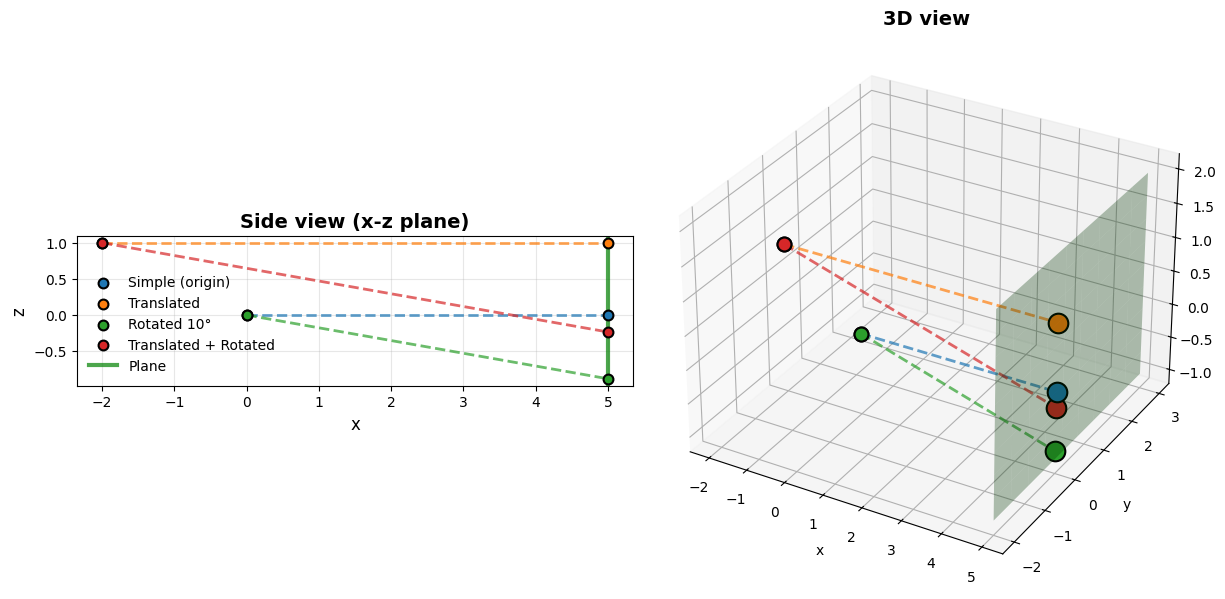
Intersection summary:
Simple (origin)     : origin=Point(+0.00, +0.00, +0.00, frame=root), intersection=Point(+5.00, +0.00, +0.00, frame=root), distance=+5.00
Translated          : origin=Point(-2.00, +0.00, +1.00, frame=root), intersection=Point(+5.00, +0.00, +1.00, frame=root), distance=+7.00
Rotated 10°         : origin=Point(+0.00, +0.00, +0.00, frame=root), intersection=Point(+5.00, +0.00, -0.88, frame=root), distance=+5.08
Translated + Rotated: origin=Point(-2.00, +0.00, +1.00, frame=root), intersection=Point(+5.00, +0.00, -0.23, frame=root), distance=+7.11
The power of local coordinates:
Each ray is defined as origin=(0,0,0) and direction=(1,0,0) in its own local frame. Each plane is centered at (0,0,0) in its frame. The intersection algorithm always works with these simple local coordinates - transformations happen automatically.
Without hazy: manually compute transformation matrices, track multiplication order, transform each point explicitly. With 10 rays and 5 planes in different frames, this becomes error-prone fast.
With hazy: define objects in natural local coordinates, let the library handle transformations.